Tunisia Visa Photo Requirement for Travel Visa Approval
When planning a tourist trip to Tunisia, travelers must carefully follow the Tunisia visa photo guidelines to ensure a smooth visa application process. A valid visa photo is a key requirement for entry approval, and it should clearly show the applicant’s face with a neutral expression, proper lighting, and a plain background. For tourists, meeting these standards helps avoid delays and increases the chances of quick visa processing before travel.

Understanding the Tunisia visa photo guidelines is especially important for international visitors heading to popular destinations like Tunis, Sousse, and Djerba. The photo must be recent, correctly sized, and free from shadows or filters to match official requirements. By following the Tunisia visa photo guidelines , travelers can ensure their application is accepted without issues, making their journey to explore Tunisia’s historic sites and coastal beauty more convenient.
What are the Tunisia Visa Photo Requirement guidelines for applicants?
The Tunisia Visa Photo Requirement guidelines are designed to ensure accurate identity verification for all applicants. These rules help immigration authorities match the traveler’s appearance with their submitted documents, reducing errors and processing delays. Applicants must follow strict standards when preparing their visa photo.
- The photo must be taken within the last six months for accurate identification
- It should be in color with a clear, natural appearance
- High-quality photographic paper is required for printed submissions
- The face must be fully visible from chin to crown with proper framing
- No filters, edits, or digital enhancements are allowed
- The background must be plain and free from distractions
- The image should not contain marks, staples, or creases
What size and format are required for Tunisia Visa photos?
The Tunisia Visa Photo Requirement is quite specific, and applicants must follow exact size and format rules to avoid delays or rejection. Below is a clear breakdown:
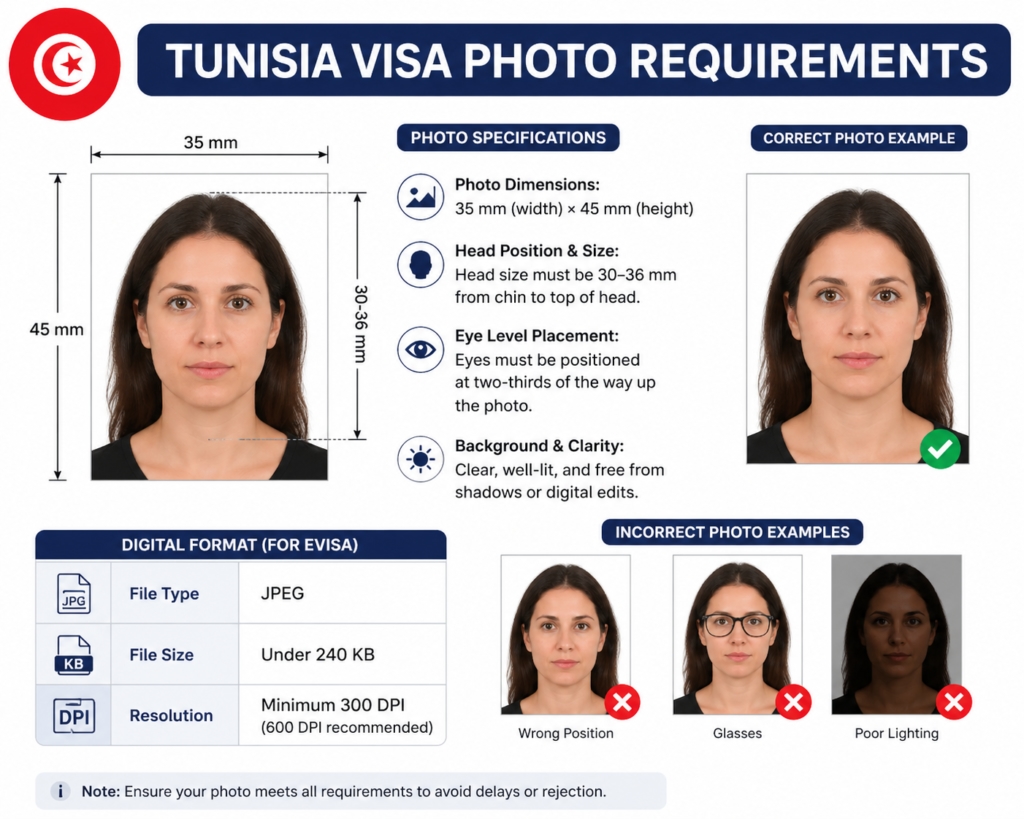
- Photo Dimensions: The standard size must be 35 mm (width) × 45 mm (height), ensuring a proper visa-style portrait frame.
- Head Position & Size: Your head should measure around 30–36 mm, from the bottom of the chin to the top of the head, centered properly within the frame.
- Eye Level Placement: The eyes must be aligned at approximately two-thirds of the way up the photo for correct facial positioning.
- Background & Clarity: The image should be clear, well-lit, and free from shadows or digital edits to meet the Tunisia Visa Photo Requirement standards.
- Digital Format (for eVisa):
- File type: JPEG
- File size: usually under 240 KB
- Resolution: minimum 300 DPI, with 600 DPI recommended for sharper quality
How to meet Tunisia Visa Photo Requirement for a successful application?
To successfully follow the Tunisia Visa Photo Requirement, applicants must pay attention to both technical accuracy and photo quality. Small mistakes in posture, angle, or image setup often lead to rejection, so proper preparation is important.
- Correct Body Position: Keep your shoulders straight and face directly toward the camera. Avoid tilting your head, as even slight angles can make the photo non-compliant.
- Avoid Selfie Photos: Do not use selfies, even with high-quality smartphones. A proper setup using a tripod or another person ensures accurate framing and natural facial proportions.
- Use Professional Setup: A controlled environment with proper lighting helps avoid shadows and distortion, which are common reasons for failing the Tunisia Visa Photo Requirement.
- Camera Distance Matters: Keep the camera at a normal distance to prevent facial distortion caused by wide-angle lenses.
- Submit Multiple Copies (if required): When applying at an embassy, provide identical copies as requested—typically one for the visa and others for administrative records.
What background is needed for Tunisia Visa Photo Requirement?
A correct background is an important part of the Tunisia Visa Photo Requirement, as it ensures clear facial visibility and proper document verification. The background must be simple, clean, and free from any distractions to meet official standards.
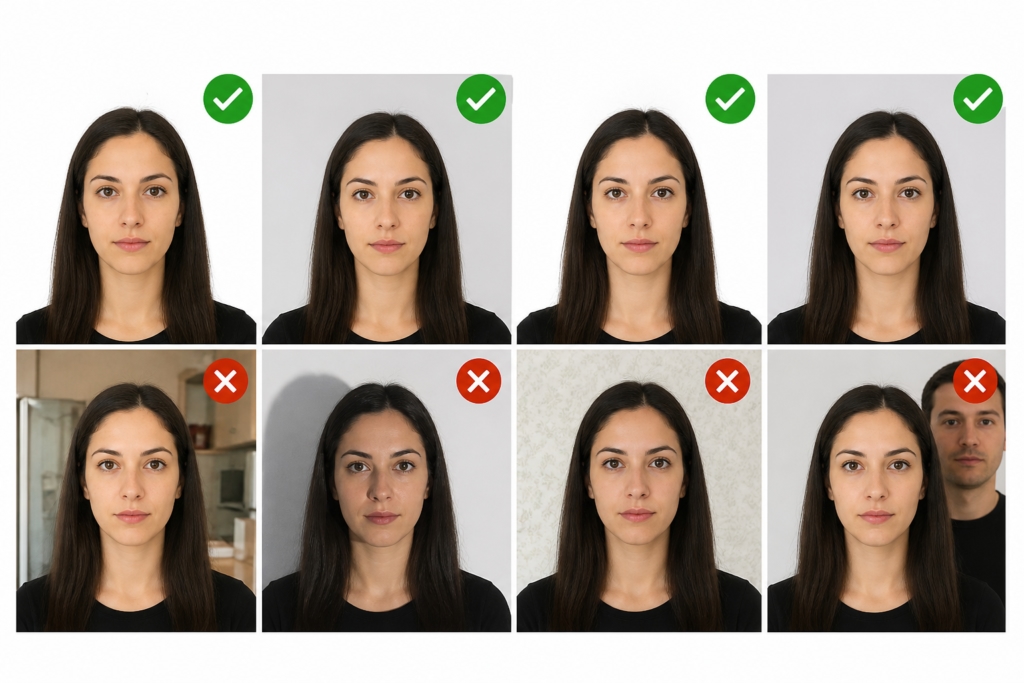
- Plain Color Requirement: The background should be pure white or light grey, ensuring a neutral and professional appearance.
- No Objects or Patterns: There must be no textures, designs, furniture, or other people visible in the frame.
- Shadow-Free Surface: Avoid any shadows behind your head or shoulders, as they can affect photo clarity and biometric scanning.
- High Contrast Setup: The background should clearly separate your face and hair from the surroundings for easy identification.
- Hair Color Consideration: If you have very light hair, a slightly light grey background may help improve visibility and edge detection.
What common mistakes should be avoided in Tunisia Visa Photo Requirement?
To comply with the Tunisia Visa Photo Requirement, applicants must avoid several common errors that often lead to rejection. These mistakes are usually simple but very important for approval.
- Wearing Glasses: Unless medically necessary (with a supporting doctor's note), it is best to remove glasses to avoid glare or the frame obscuring your eyes.
- Over-Smiling: While you might want to look friendly, a "toothy" smile changes the shape of your face. Stick to a neutral expression.
- Uniforms: Avoid wearing clothing that looks like a uniform or camouflage. Professional or casual everyday attire is best.
- Shadows: Lighting must be even. Shadows on one side of the face or behind the ears are frequent causes for rejection.
How to take a proper photo for Tunisia Visa Photo Requirement standards?
To correctly follow the Tunisia Visa Photo Requirement, your photo must be taken with proper setup, lighting, and posture. Whether at home or in a studio, these steps help ensure approval.
- Correct Positioning: Stand or sit about 1 to 2 meters away from the camera to avoid facial distortion and ensure natural proportions.
- Balanced Lighting Setup: Use two light sources placed at 45-degree angles to your face. This helps remove shadows and creates even illumination.
- Direct Eye Contact: Look straight into the camera lens. Your eyes (iris and pupils) must be clearly visible and not covered or blurred.
- Neutral Mouth Expression: Keep your mouth closed and relaxed, avoiding smiling or facial tension to maintain a standard biometric expression.
- Stable Camera Setup: Use a tripod or fixed support to keep the image steady and properly framed.
- Plain Background Use: Ensure a clean white or light grey background, free from shadows or objects, as required in the Tunisia Visa Photo Requirement.
What are the Tunisia Visa Photo Requirement rules for infants and children?
Photographing children is notoriously difficult, but the rules are slightly more relaxed for the youngest travelers.
- Infants (under 1 year): It is acceptable if their eyes are not fully open. They can be photographed lying down on a plain white sheet or sitting in a car seat covered with a white cloth.
- No Interference: No hands, toys, or parents’ faces can be in the frame.
- Children: They must follow the same size and background rules as adults, looking straight ahead with a neutral expression.
How to upload a photo under Tunisia Visa Photo Requirement guidelines?
Uploading your photo correctly is an important step in meeting the Tunisia Visa Photo Requirement, especially for online or eVisa applications. A small technical mistake can lead to rejection, so follow these steps carefully:
- Prepare the Correct File Format: Ensure your photo is in JPEG format, as most Tunisia eVisa systems only accept this type.
- Check File Size Limit: Keep the image usually under 240 KB to match system upload restrictions and avoid upload errors.
- Maintain Proper Resolution: Use a clear image with at least 300 DPI (higher like 600 DPI is preferred for better clarity and scanning accuracy).
- Upload from a Stable Device: Use a reliable computer or smartphone with a stable internet connection to prevent file corruption during upload.
- Follow Portal Cropping Rules: Some systems may automatically crop your image—ensure your face remains centered and fully visible before final submission.
- Double-Check Preview: Always review the uploaded photo preview to confirm it meets all Tunisia Visa Photo Requirement standards before submitting the application.
What causes rejection in Tunisia Visa Photo Requirement submissions?
Rejections under the Tunisia Visa Photo Requirement often happen when the photo does not meet ICAO biometric standards. These rules ensure facial recognition accuracy and document consistency. Below are the most common reasons:
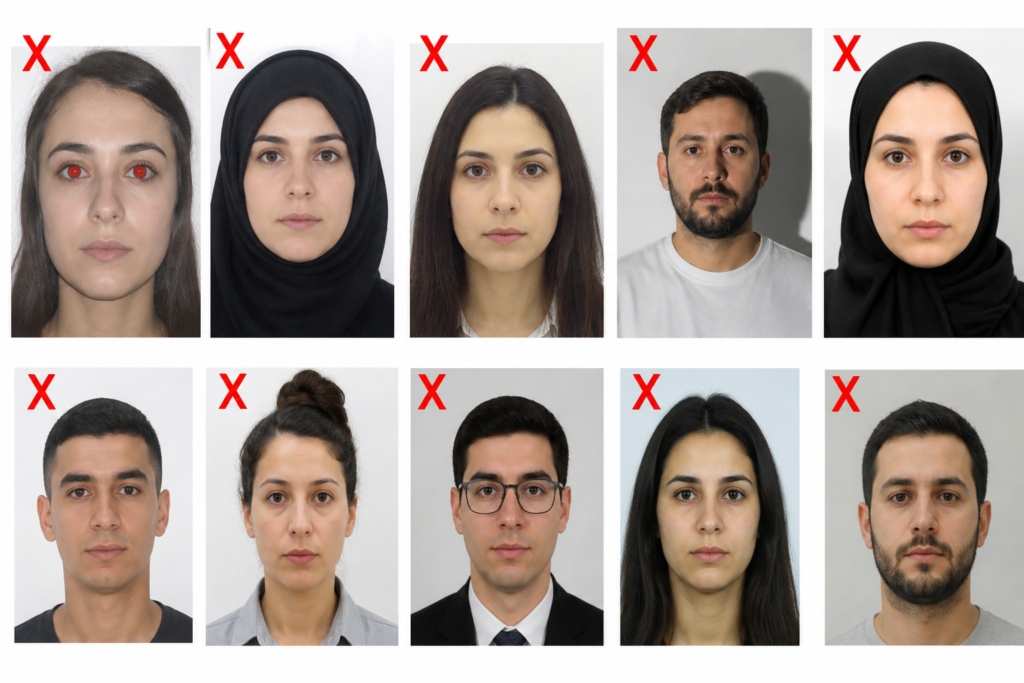
- Red-Eye Effect: Using a direct camera flash can cause red-eye, which interferes with biometric scanning and leads to automatic rejection.
- Improper Head Coverings: Head coverings are only allowed for religious reasons, but they must not cast shadows and the face (from chin to forehead) must remain fully visible.
- Low Background Contrast: If the background and face blend too much, it reduces clarity. A proper white or light grey background is required for clear separation.
- Shadows on the Face or Background: Any shadow on facial features or behind the head can affect photo quality and biometric detection.
- Non-Compliance with ICAO Standards: The photo must meet strict international formatting rules, including correct lighting, posture, and clarity.
Conclusion:
Meeting the Tunisia Visa Photo Requirement is a straightforward process if you adhere strictly to the technical specifications. By focusing on the 35x45 mm dimensions, ensuring a clean white background, and maintaining a neutral expression, you significantly increase your chances of a hassle-free approval. Remember that the photograph is the first impression you make on the immigration authorities; making it clear, professional, and accurate is the best way to ensure your journey to Tunisia begins on a positive note. Double-check your digital files for resolution and your physical prints for any damage before submission to avoid unnecessary delays.
Comments